
Why Do So Many People Think a Netflix Subscription Is Too Expensive?
Netflix offers several subscription tiers with different prices and features. The problem is, many people automatically choose the most expensive plan without actually needing all of its features. The result? Their monthly expenses balloon for features they rarely use, such as 4K quality on a small phone screen or unused additional profile slots.
The good news is, you can enjoy Netflix without breaking the bank. The key is to understand the differences between each plan, identify your own needs, and take advantage of the official options available.
Differences Between Netflix Plans You Need to Know
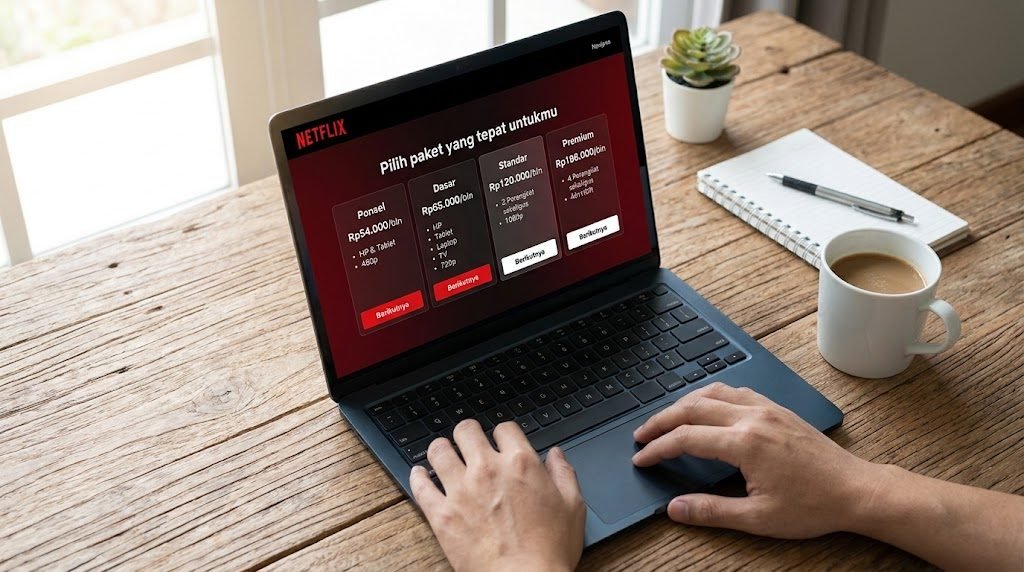
Netflix typically offers several plan tiers. While the exact names and prices may change at any time, the differences generally come down to three main factors:
- Video quality-ranging from SD (480p), HD (720p/1080p), to Ultra HD/4K. The higher the resolution, the more expensive the plan.
- Number of devices-how many screens can stream simultaneously at one time.
- Additional features-such as the ability to download content for offline viewing and the availability of spatial audio.
For the latest details on prices and features for each plan in Indonesia, always check the official Netflix website directly, as this information is frequently updated.
How to Choose a Netflix Plan That Fits Your Needs
Before choosing, answer these three questions:
1. On Which Device Do You Watch Most Often?
If you watch more often on your phone or tablet, an HD plan is more than enough. You’ll only really notice the difference with 4K resolution on large screens, such as 43-inch smart TVs and larger. Paying extra for 4K but watching on a 6-inch screen is a common waste of money.
2. How Many People Will Be Watching at the Same Time?
If it’s just you, the basic plan is sufficient. If you’re part of a household with several family members whose viewing schedules often overlap, consider a plan that supports more simultaneous screens. Netflix does offer a sharing feature within a single household, subject to their terms and conditions.
3. How Often Do You Watch?
This is a question that’s often overlooked. If you only watch on weekends or a few times a month, consider whether a full monthly subscription is really worth it. Some people choose to subscribe only during certain months when there are series or movies they want to watch, then pause their subscription during other months.
Legitimate Tips for Saving on Your Netflix Subscription
Here are some ways to save on your Netflix expenses without breaking the rules:
Start with the Most Affordable Plan
Try the cheapest plan first. If the video quality isn’t good enough or you need more screens, then upgrade. It’s better to upgrade gradually than to jump straight to the premium plan and regret it later.
Take Advantage of the Offline Download Feature
Instead of streaming repeatedly and using up your data allowance, download content while connected to Wi-Fi. This also helps you watch more efficiently without being interrupted by buffering.
Review Your Subscription Regularly
Every two or three months, check your viewing history. If it turns out you rarely use Netflix, pause your subscription temporarily. Netflix lets you cancel and resubscribe anytime without penalties.
Keep an Eye Out for Official Promotions
Occasionally, Netflix or official payment partners-such as mobile carriers and e-wallet platforms-offer bundled promotions. Keep an eye out for these deals, as they can save you a significant amount.
Common Mistakes When Subscribing to Netflix
There are a few habits that make your streaming spending inefficient:
- Never logging out of old devices-devices you no longer use remain connected, sometimes wasting screen slots.
- Subscribing but rarely watching-this is more common than you might think. Check whether you’re actually making the most of your subscription.
- Ignoring ad-supported plans-in some regions, Netflix offers cheaper plans with ads. If you don’t mind short ad breaks, this can be a cost-effective option.
- Paying for features you don’t use-such as 4K for mobile viewers or multiple screen slots for a single user.
Get Premium App Subscriptions More Affordably on Kindastream
In addition to Netflix, there are many other premium apps that can support your entertainment and productivity-from Spotify and YouTube Premium to tools like Canva and online learning apps. On Kindastream, you can find a variety of premium app subscription plans at more affordable prices.
On Kindastream, you can choose from various Netflix rental options-daily (such as 6 hours, 12 hours, or 1 day), weekly (3 days or 7 days), or monthly subscriptions. Payments can be made conveniently via QRIS, bank transfer, or e-wallet. Once payment is successful, account details (such as the order access link) will be sent immediately so your account is ready to use. Every rental and subscription also comes with a guarantee for the duration of the active period, as well as support from the Kindastream help team via WhatsApp, who are ready to assist if any issues arise. If you want to enjoy premium digital services without overspending, check out the Kindastream catalog and find the package that’s right for you.